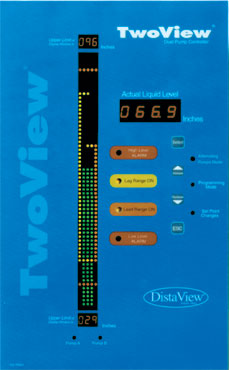
Let's say you are controlling a lift station at a municipal water
treatment plant that is 40 feet deep. The pressure/levle sensor
is located 2 feet above the bottom of the well or pit and the Sensor
Range is 60 feet. With 5 feet of water in the well you're going
to cavitate the pumps, and 40 feet deep will probably cause flooding.
You'd like the LEAD PUMP to start pumping when the level rises to
29 feet and have the LEAD PUMP turn OFF when the level falls back
to 10 feet deep. The backup pump LAG PUMP should start pumping if
the water rises to 35 feet deep. Both pumps will continue pumping
until the level returns to 10 feet deep and then both will shut
off. Taking these programming steps will maintain an overall water
level in the lift station between 10 and 35 feet.
The High Alarm circuit will be activated at 37 feet deep and the
Low Alarm circuit will be activated at 7 feet. The cross-section
"window" into the lift station that is displayed on the
vertical Bar Graph will be 5 through 38 feet.
|
1
|
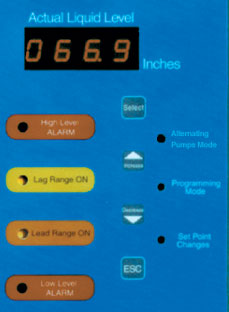
Press the SELECT button - RANG will appear followed by a flashing
R___. The Transducer Range of 60 feet needs to be entered, using the
INCREASE or DECREASE arrows.
The manufacturer setting is printed on the sensor.
|
2 |
Press SELECT; see OFST displayed, followed by
a flashing L___. Enter 2 feet - which is the height the sensor is
mounted above the bottom.
|
3 |
Press SELECT; see P___; enter 38 feet as The Upper Limit in Display
Window level.
NOTE: It is not a control or alarm level. |
4
|
Press SELECT; see P___; enter 5 feet as
The Lower Limit in Display Window level.
NOTE: It is not a control or alarm level. |
| 5 |
Press SELECT; see P___; enter 37 feet as
The High Level Alarm depth. |
| 6 |
Press SELECT; see P___; enter 29 feet as
LEAD Pump ON level. |
7 |
Press SELECT; see P___; enter 10 feet as
LEAD Pump OFF level. |
8 |
Press SELECT; see P___; enter 35 feet as
LAG Pump ON level. |
9 |
Press SELECT; see P___; enter 10 feet as
LAG Pump OFF level. |
10 |
Press SELECT; see P___; enter 7 feet as
Low Alarm level. |
| |
Press the ESC button after you have entered all of the set points.
You're finished, and will return to operating mode....return DIP #1
to OFF / locked.
|